Approaches To AI RAG
ThinkAutomation provides multiple options for automating RAG (Retrieval Augmented Generation) workflows with AI. In simple terms, RAG means retrieving up-to-date or relevant information and supplying it to an AI model so it can answer a question about that information.
ThinkAutomation is purpose-built for automating RAG, combining seamless access to on-premises and cloud data sources - such as documents, emails, databases, SharePoint, CRM systems and APIs - with the ability to perform real-time lookups across them. It also includes a built-in Web Chat message source, making it easy to add an interactive, AI-powered chat interface to your RAG workflows.
ThinkAutomation can work with multiple AI providers, including:
| AI Provider | Link To Create API Key |
|---|---|
| OpenAI | OpenAI API |
| Azure | Azure Foundry |
| Grok | xAI API |
| Gemini | Gemini API |
| Claude | Claude API |
| Perplexity | Perplexity API |
| Mistral | Mistral API |
| OptimaGPT On-Prem AI Server | OptimaGPT |
By supporting multiple AI providers, you can build AI automation solutions in ThinkAutomation without vendor lock-in and without redesigning your RAG implementation.
ThinkAutomation includes several built-in features that can be used to build automated RAG pipelines:
- Embedded Knowledge Store
- Embedded Vector Database
- Full Text Search
- Document-to-Text Conversion
- AI Connector (MCP) message source
- Database and API-based lookups
- Lookup From A Database Using AI
The right method depends on your use case.
For example, the Knowledge Store and Vector Database offer semantic or fuzzy search - ideal for rich, unstructured content such as product manuals or knowledge articles, where you want results based on meaning rather than exact text matches. However, for structured data (like invoices or order records), these techniques may be less effective. In such cases, Full Text Search, SQL lookups, or API queries provide more accurate, context-specific results.
Regardless of how the context is gathered, you then use the Ask AI action with the Add Context operation to attach that context. After that, use the Ask AI action again to send the user's question (now enriched with the context) to the AI and return the final response.
Use Cases
Below are some use cases and the recommend approaches to asking questions about:
1. Product Documentation/Knowledge Articles
Use the Embedded Knowledge Store if the total number of articles is fewer than 10,000. The Knowledge Store can be updated automatically using the Embedded Knowledge Store automation action, or maintained manually using the Embedded Knowledge Store Browser. To use it during an AI query, call the Ask AI automation action with the Add Context From A Knowledge Store Search operation. This adds relevant Knowledge Store entries to the context before the AI generates its response.
If your dataset exceeds 10,000 articles, use the Embedded Vector Database instead. Update it using the Embedded Vector Database action, and retrieve context using the Add Context From A Vector Database Search operation.
2. A Collection Of Documents Stored On Your File System
There are two main approaches for document RAG. You can use - either individually or together:
- File Pickup Source > Vector Database or Full Text Search Use the File Pickup message source to automatically process and index new documents as they are added to your file system. In the File Pickup automation, use the Embedded Vector Database action to add document contents to a vector database collection. This method works well for general, content-rich documents. However, if the documents mainly contain specific structured data (e.g., 'Invoice number 12345'), use the Full Text Search automation action instead. Within your AI automation, use the Ask AI to add context from a vector database or full text search. This will work for any AI provider type.
- AI Connector Source > On-Demand Retrieval Use one or more AI Connector message sources to allow the AI itself to decide when it needs to call ThinkAutomation for additional context. In the AI Connector automation, locate the relevant document using the parameters supplied by the AI, and convert it to text using the Convert Document To Text action. The resulting text is then returned to the AI as dynamic context.
3. Data Stored In A Database
There are two primary approaches for database-driven RAG:
- Natural Language Querying Use the Lookup From A Database Using AI action to translate a natural language question into a SQL query automatically. You can then pass the results to the Ask AI action using the Add Static Context operation.
- AI Connector with Direct Database Lookups Use AI Connector message sources to let the AI request specific data directly. In the corresponding automation, perform targeted database lookups using the parameter values supplied. Return the query results as text - which the AI will then use as contextual input,
4. Data Stored In A CRM System Or SharePoint
There are two primary approaches for CRM or SharePoint RAG:
- Scheduled Pre-Population With this approach, you use ThinkAutomation to perform scheduled queries against your CRM or SharePoint system. For each record/document, update a ThinkAutomation vector database collection. This could be daily or weekly, depending on how often content changes. Within your AI automation, use the Ask AI to add context from a vector database search. This will work for any AI provider type.
- AI Connector with Direct CRM/SharePoint Lookups Use the AI Connector message sources to let the AI request specific data directly. In the corresponding automation, perform targeted CRM or SharePoint lookups using the parameter values supplied. Return the results as text - which the AI will then use as contextual input.
5. Email Repository
To enable a 'chat with your emails' RAG scenario, use the Embedded Vector Database to add all emails to a vector database collection. You can use multiple email Message Sources to add emails from multiple accounts to the same vector database collection. Use the %Msg_MessageStoreId% built-in field as the vector record key - this ensures each email has a unique id. For example:
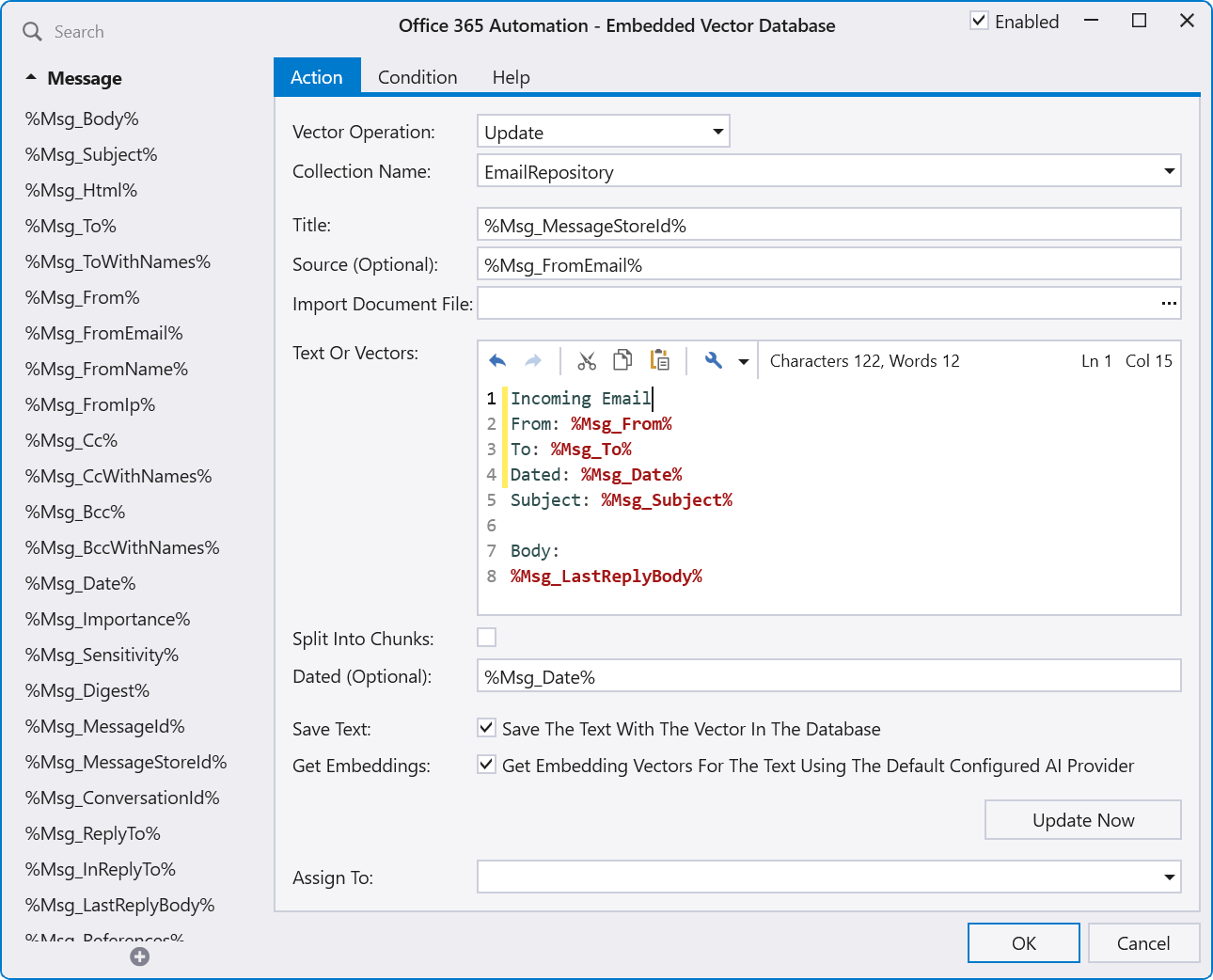
You could also add Sent Items by using a Message Source to read a sent items folder, add to the same vector database collection, but change the 'Incoming Email' tag in the text to 'Sent Email'.
Once the message sources are configured, new emails will automatically be added to the vector database. A separate Web Chat message source can then be used to chat with the vector database.
6. Data Obtained From An API Call
For real-time data retrieval via external systems or APIs:
- Use one or more AI Connector message sources.
- Within the related automation, use HTTP Get or HTTP Post actions to perform the API call.
- Return the API results from the automation - these will be sent back to the AI as context for its response.
7. Performing Specific Actions During AI Requests
You can also use the AI Connector message source to perform specific actions rather than returning data. For example: Suppose you want your AI workflow to respond to a prompt such as 'Can you send an email'. In this scenario, you would create an AI Connector message source with description of 'Use this tool when the user asks to send an email' and parameters: ToAddress, Subject and Body. The AI will ask for the to address, subject and body if the user has not already supplied these. The automation would execute when this AI Connector is called by the AI. In the automation, use the extracted parameter values to send the email and return an 'Email Sent' response.
Combining RAG Techniques
You can combine multiple approaches in a single automation workflow. For example, a top-level automation can use Ask AI to determine which retrieval technique to use based on the question type, then Call a sub-automation to perform the lookup. The result can then be added to the parent automation’s conversation context before generating a final AI response.
Benefits Of Using ThinkAutomation For RAG
Using ThinkAutomation for RAG keeps your data secure, current, and under your control, while avoiding the need to upload documents to external AI platforms or train a custom model. ThinkAutomation retrieves information locally from your own databases, file systems, and knowledge stores at query time, ensuring answers are always up-to-date and reducing exposure of sensitive or regulated data. Because the same automation flow works with any AI provider (including fully on-premises options like OptimaGPT), you avoid vendor lock-in and can switch or combine AI models without rebuilding your solution - delivering accurate, context-aware responses without sacrificing ownership, flexibility, or compliance.
Professional Services
If you need help designing or optimizing your AI + RAG implementation, the Parker Software Professional Services team can assist with planning, configuration, or custom development. Contact Professional Services for more information.